Page 1 of 3
Blender
Posted: Wed Sep 07, 2016 3:50 pm
by someone
For all you people who prefer Blender to 3dMax, I have created blender file of the skinned characters for creating clothing and armour. I also included an example weapon.
Also because everyone seemed to have problems with exporting from blender, I have also fixed up a plugin to work with Kenshi based on the one from Torchlight.
The plugin has now been ported to Blender 2.80:
The template file is designed to work with this plugin.
When exporting skinned meshes such as clothing, hair and armour, you need the tangents and binormals options on. The skeleton will be linked with the existing Kenshi male or female skeleton if your mesh is linked to the armature object in Blender.
Don't change the names of the armature objects, or edit any bones. Messing with the pose is fine though.
Non-skinned meshes like weapons just need tangents enabled.
Make sure your mesh is UV mapped.
Material files that are created are completely unnecessary as materials are set up in the FCS. You can delete them if they are created.
I also made a handy viewer program for displaying mesh and collision files.
Old plugin versions:
Re: Blender
Posted: Wed Sep 07, 2016 11:46 pm
by arkhiel
I prefer 3DSmax personnaly, but THANKS, hope it helps a lot of modders

Re: Blender
Posted: Thu Sep 08, 2016 8:34 pm
by Spooky
Much appreciated.
Re: Blender
Posted: Sun Sep 11, 2016 5:53 pm
by dethbegins
may i ask, cause i can't seem to correctly install the said plugin, you happen to have a tutorial?
Re: Blender
Posted: Sun Sep 11, 2016 6:14 pm
by Spooky
In Blender's install folder, put the plugin in scripts\addons. In Blender, go to User Preferences->Addons and find and enable it. You can just search Kenshi there since it's in the name.
Re: Blender
Posted: Wed Jun 07, 2017 9:54 pm
by evilgoat
Any good tutorial for making new armor for kenshi with blender step-by-step?
What I've done so far :
- Open the template in blender
- Make new object (belt)
- Add armature modifier and assign the hip bone
- Assign the correct vertex group for the belt by selecting current list of vertex group and assign it
- go to edit mode and make seam
- unwarp the model on the newly made UV image object
- back to object mode, select the belt, and use the export kenshi mesh
the console return success note, but after I added it to the mod using "Forgoten Construction Set", when I open it on kenshi, it didn't shown.
Re: Blender
Posted: Sat Jul 01, 2017 6:24 am
by OngaaftheUnliving
This looks like it can perhaps offer some useful information with my helmet project that I am still trying to figure out.
I attempted to export a sword I made in blender using the kenshi exporter and it exports my mesh into an "XML Document" file and a "MATERIAL" file. Neither formats are readable in the Forgotten Construction set. Is there a known way around this?
Thanks.
Re: Blender
Posted: Fri Oct 13, 2017 4:21 pm
by someone
Finally finished off the blender plugin!
It now supports morphs (shape keys) used by the character editor face sliders.
It also supports vertex alpha data used by some materials, and animations.
I added a collision file exporter too. Attach rigid bodies to objects to use this.
Re: Blender
Posted: Tue Oct 24, 2017 3:41 pm
by seosirk
is there any guide in how implement armors and hairstyles?, a youtube video or anything, please.

Re: Blender
Posted: Sat Oct 28, 2017 12:55 am
by Recatek
Just curious, is this Garru skeleton correct? Looks like the back legs aren't aligned properly. Not sure if it's just a skeleton quirk or something not aligned right in the Blender plugin import process.

Re: Blender
Posted: Mon Oct 30, 2017 3:09 pm
by someone
That skeleton is weird. It has other strangeness to it too, such as the clavicle bones parented to the neck rather than the spine.
It must be something odd that happened when it was exported from 3DSMax because it seems to be correct like this.
Re: Blender
Posted: Mon Oct 30, 2017 9:35 pm
by Recatek
Either way, not worth bending over backwards for at this stage. I don't and I don't think anyone else has any plans of making models for animals at the moment beyond some musing on the discord about spider armor. Even then, I wonder if the import skeleton's correctness even affects weight painting for skinning. It may not be a problem even if it is a bit funky.
Re: Blender
Posted: Tue Oct 31, 2017 1:19 pm
by someone
The bones are actually like that in the game too. Technically it doesn't make any difference which way the bone is pointing as it is consistent. Weight painting is merely per-vertex data and is not affected by bone locations unless you are auto-generating it from the skeleton. There is no problem other than looking strange.
Re: Blender
Posted: Tue Oct 31, 2017 4:16 pm
by Recatek
Oh okay sorry, I misunderstood. I thought the imported skeleton was different from the in-game skeleton. If they're the same then there's no issue.
Re: Blender
Posted: Sun Nov 26, 2017 9:07 am
by Sziklamester
It is nice to have an option for blender users I personally myself using it but I am pretty beginner with blender in the terms of knowing the full options and what can I do with it. This plugin seems useful and I will try it soon because I liked this game at first sight and it would be nice to have more models, races and overall more customization options. This game is cool and I wish to make some extras later for this but not sure what need to do for the implementation because beyond making a model and maybe rigging it I am not so advanced yet to make a full animation cycle or reproduce the in game animations. If someone have a good video tutorial or explanation step by step what need to do then it could help me a lot with that. I would like that and much appreciate it.
Re: Blender
Posted: Sat Apr 13, 2019 5:22 am
by Selphadur
Thank you for exporter udate! It fixed body seams problem (before you had to invert green channel for normal maps). Now it is all good. Although there are still very visible neck seams. Any idea how to fix it? Or we will just wait for possible fix from devs (maybe provided template model needs update?). Anyways, thank you so much for your time, devs!
Re: Blender
Posted: Sat May 11, 2019 5:30 pm
by bowidl
Thank you for the template and the script!
I have a question about the skeleton. The bone Bip01 L Hand is much longer than Bip01 R Hand. Attached to the left hand is a final bone Bip01 Prop1 which is at the same position as the corresponding right hand bone Bip01 Prop2 (in resting pose). Does this have something to do with holding a weapon in both hands?
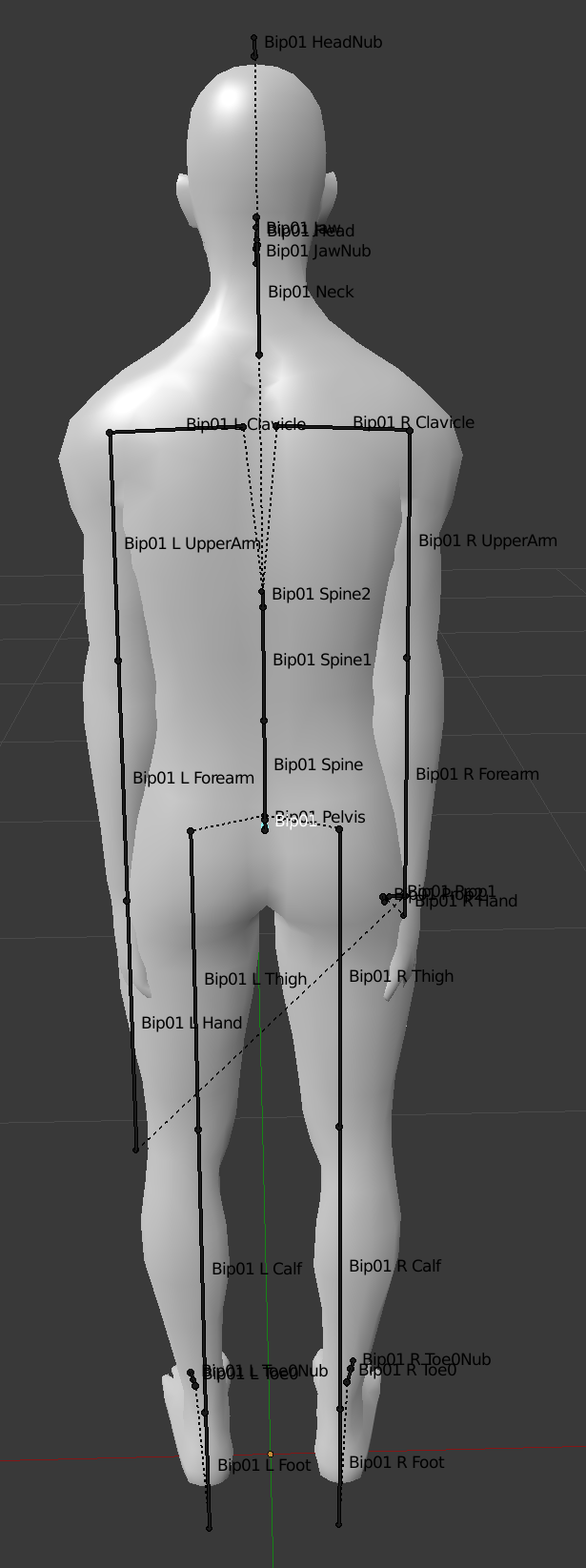
- skeleton_rest.PNG (209.32 KiB) Viewed 76488 times
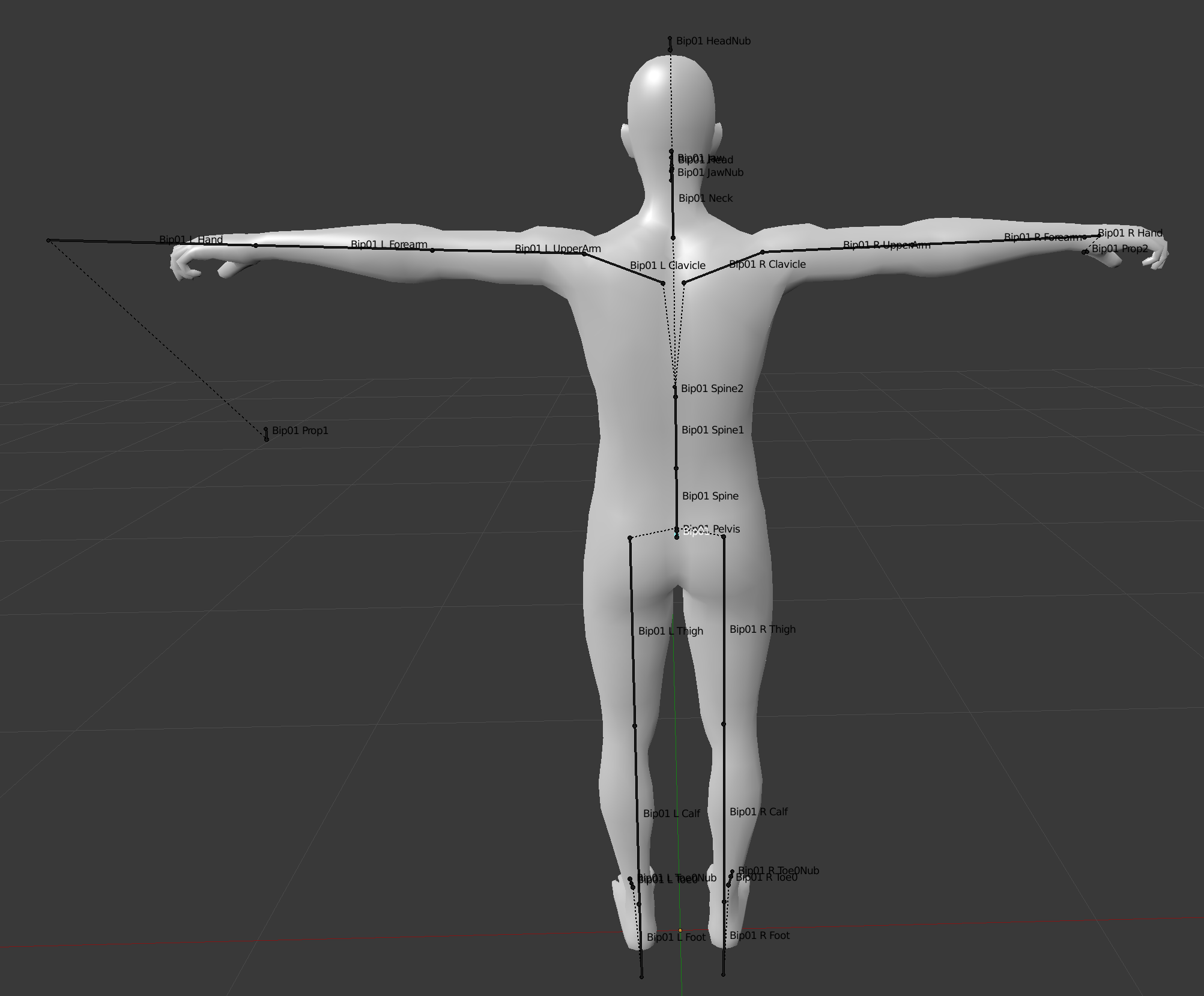
- skeleton_pose.PNG (276.96 KiB) Viewed 76488 times
Re: Blender
Posted: Sun May 12, 2019 9:06 pm
by Psigh
I found a possible bug: when importing the bull.mesh or bull_nohorns.mesh into blender i get a weird error. When i export a mesh linked to the skeleton the mesh will not be exported at all. I'm trying to provide a screenshot of everything i see upon import, i tried importing most of the other animal meshes and this problem does not occurr. I also think i remember this problem not occurring a few days ago, i later had to download the latest version of the game, but i cannot be sure that's what caused this. I do have the latest version of the blender mesh plugin.

Re: Blender
Posted: Mon May 13, 2019 5:54 am
by mstrdenton
I tried making a boar using the bull armature and it did just that.
Code: Select all
saving...
C:\Program Files (x86)\Steam\steamapps\common\Kenshi\data\animal\meshes\boar_bullarmature.mesh
No objects selected for export.
saving...
C:\Program Files (x86)\Steam\steamapps\common\Kenshi\data\animal\meshes\boar_bullarmature.mesh
Traceback (most recent call last):
  File "C:\Users\danie\AppData\Roaming\Blender Foundation\Blender\2.79\scripts\addons\io_mesh_Kenshi\__init__.py", line 345, in execute
    result = OgreExport.save(self, context, **keywords)
  File "C:\Users\danie\AppData\Roaming\Blender Foundation\Blender\2.79\scripts\addons\io_mesh_Kenshi\OgreExport.py", line 1048, in save
    bCollectSkeletonData(blenderMeshData, selectedObjects)
  File "C:\Users\danie\AppData\Roaming\Blender Foundation\Blender\2.79\scripts\addons\io_mesh_Kenshi\OgreExport.py", line 933, in bCollectSkeletonData
    skeleton = Skeleton( selectedObjects[0] )
  File "C:\Users\danie\AppData\Roaming\Blender Foundation\Blender\2.79\scripts\addons\io_mesh_Kenshi\OgreExport.py", line 166, in __init__
    if bone.name in self.ids: self.bones[ self.ids[bone.name] ] = bone
IndexError: list assignment index out of range

location: <unknown location>:-1

location: <unknown location>:-1
Re: Blender
Posted: Tue May 14, 2019 2:29 pm
by someone
Turns out there was a bug in the importer that was messing up the bull skeleton. Version 0.8.14 should fix this.
The lengths of the bones don't actually mean anything. They are calculated by the importer based on where any child bones are. The updated version does a better job of this as I noticed some bones were appearing far too small.